Why Rough Stone Is the Right Choice for Bold, Authentic Typography
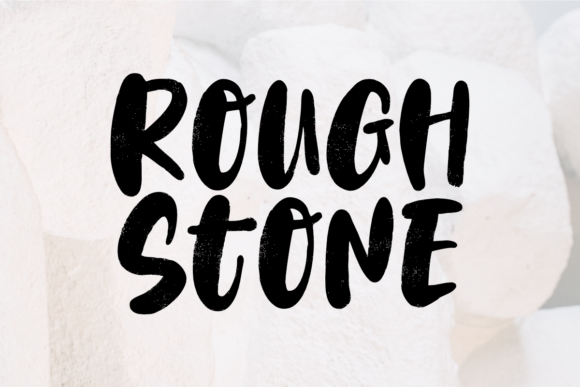
If you have ever struggled to make a headline pop without looking like a cheap discount flyer, you know exactly why Rough Stone exists. It is not just another display font; it is a tool designed to bring texture and weight to your projects in a way that feels genuinely handcrafted. The characters are bold and beautifully textured, creating an authentic feel that digital type often lacks. When you need to stand out from the crowd, this rough-hewn aesthetic offers a distinct advantage over the clean, sterile lines of standard sans-serifs.
However, while the visual impact is undeniable, using Rough Stone effectively requires more than just dropping it into a design file. Many creators rush to apply heavy textures without considering readability or context, leading to designs that look messy rather than rugged. Before you download or purchase this typeface, it is crucial to understand its specific strengths and the common pitfalls that can undermine your work.
The Allure of Texture: What Makes This Typeface Special
In a sea of perfectly smooth vectors, Rough Stone stands out because it mimics the imperfections of physical materials. The characters are bold and beautifully textured to create an authentic feel, suggesting something carved, stamped, or weathered by time. This makes it an ideal choice for brands that want to convey durability, heritage, or raw energy.
For small business owners and entrepreneurs, this font can instantly communicate a sense of craftsmanship. Imagine a logo for a craft brewery, a construction company, or a vintage clothing store. The texture adds depth that flat colors simply cannot achieve. However, the very feature that makes it attractive—the roughness—can also be its downfall if misused.
When Texture Becomes Noise
A frequent mistake beginners make is assuming that "rough" means "unreadable." While Rough Stone is designed as a display font, meaning it is best suited for headlines, titles, and short phrases, applying it to body text is a recipe for disaster. The internal texture of the letters can interfere with legibility, especially at smaller sizes or on low-resolution screens.
Do not try to force this typeface into long paragraphs of content. The eye needs to rest, and the jagged edges of these characters demand too much focus for extended reading. Instead, reserve Rough Stone for the moments where you need maximum impact. Use it to anchor your design, then let cleaner, simpler fonts handle the detailed information.
Common Pitfalls in Application and Design
Even experienced designers sometimes overlook the nuances of working with textured typefaces. Understanding these potential errors can save you hours of rework and ensure your final output looks professional rather than amateurish.
- Ignoring Contrast: Because the font has built-in texture, it creates visual noise. If you place it against a busy background or a similarly textured image, the text will disappear. Always test your contrast levels. A solid, neutral background usually works best to let the character details shine.
- Misjudging Weight: The characters are bold by nature. Pairing them with other heavy fonts can result in a design that feels clunky and overwhelming. Balance the heaviness of Rough Stone with lighter, thinner weights in your supporting typography to create a harmonious hierarchy.
- Overusing the Style: There is a temptation to use the most unique font available for every single element. If you use Rough Stone for the title, the subtitle, the buttons, and the footer, the design loses its focal point. Use it sparingly to highlight key messages.
These mistakes affect usability and communication significantly. If a customer cannot read your price list or your contact information because the font texture clashes with the background, you have failed your primary goal. Efficiency drops when you have to redesign assets, and satisfaction plummets when the message gets lost in the style.
Evaluating Your Project Needs Before You Buy
Before you commit to acquiring Rough Stone, take a moment to evaluate whether it truly fits your project's goals. Not every brand needs a rugged aesthetic, and forcing it onto a project that calls for elegance or minimalism can feel jarring.
Ask yourself these practical questions:
- What is the mood? Does your brand represent strength, history, or grit? If yes, this font aligns well. If you are selling luxury skincare or financial consulting, this might be the wrong choice.
- Where will it appear? High-resolution print materials like posters, packaging, and banners are perfect for showcasing the detailed texture. For web use, ensure the font renders clearly across different devices. Sometimes, the intricate details get lost on mobile screens if the resolution is low.
- Is it legible at size? Test the font at various sizes. A headline that looks great at 72 points might become illegible at 18 points. Remember that Rough Stone is a display font, so keep it large.
Comparing Options: Rough Stone vs. Alternatives
You might find other fonts that claim to offer a similar "rugged" look. When comparing, look closely at the kerning (spacing between letters) and the consistency of the texture. Some cheaper alternatives have uneven spacing that makes words look disjointed. Rough Stone is praised for its balanced composition, ensuring that even with its rough edges, the letters sit together comfortably.
Additionally, check the licensing terms. As a professional creator, you need to know how you can use the font. Can you use it for commercial logos? Can you embed it in an app? Ensuring you have the correct license prevents legal headaches later. Avoid downloading free versions from sketchy sites that may contain malware or incomplete character sets.
Best Practices for Professional Results
To get the most out of this typeface, adopt a disciplined approach to your workflow. Start by setting up a clear hierarchy. Let Rough Stone be the hero, but give it room to breathe. Use generous whitespace around your headlines to prevent the design from feeling cluttered.
Consider color carefully. Black and white are classic choices, but don't be afraid to experiment with muted earth tones that complement the stone-like quality of the font. Bright, neon colors might clash with the organic feel of the texture. Keep the palette cohesive to maintain a polished look.
Finally, always proofread. Textured fonts can sometimes hide spelling errors or awkward letter combinations. Zoom in to 100% or higher to inspect the glyphs closely. Ensure that the descenders and ascenders do not clip unexpectedly due to the texture. A little extra attention to detail here goes a long way toward elevating the perceived quality of your entire project.
By respecting the characteristics of Rough Stone and avoiding common application errors, you can create designs that are both striking and functional. It is a powerful asset for anyone looking to add a touch of authenticity and boldness to their visual identity. Whether you are a freelancer pitching a new client or a blogger trying to capture attention, using this font correctly can make all the difference in standing out from the crowd.