Hikara: Integrating a Bold Display Font into Professional Design Workflows
In the landscape of digital and print design, typography is rarely just an aesthetic choice; it is a functional component of communication. For professionals ranging from freelance marketers to small business owners, selecting the right typeface is a critical step in the pre-production phase. It dictates hierarchy, sets the tone, and influences readability before a single image is placed or a paragraph is justified. Among the growing library of modern display fonts, Hikara has emerged as a distinct asset for creators seeking a balance between cool sophistication and bold impact.
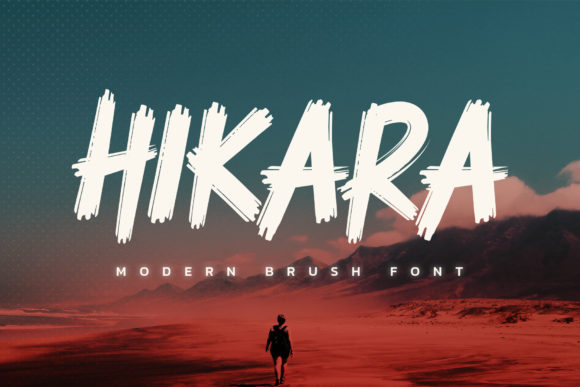
Hikara is characterized by its brushed, expressive strokes that give it a hand-crafted feel without sacrificing the precision required for professional layouts. Unlike rigid geometric sans-serifs or overly ornate serifs, Hikara occupies a unique middle ground. It offers the structural integrity of a display font while retaining the organic warmth of brush lettering. This article explores how to integrate Hikara into various workflows, from initial concept planning to final asset delivery, ensuring that this font serves not just as decoration, but as a strategic element of your design process.
Understanding the Role of Display Fonts in Modern Workflows
Before diving into the specific mechanics of using Hikara, it is essential to understand where display fonts fit within a broader creative process. In many professional projects, particularly those involving branding, advertising, or editorial design, the hierarchy of information is established through type size, weight, and style. Display fonts are typically reserved for headlines, titles, logos, and key visual statements. They are not designed for body text due to their expressive nature, which can reduce legibility at smaller sizes.
The integration of a font like Hikara requires a shift in mindset from "filling space" to "establishing voice." When you select Hikara, you are making a deliberate decision to convey energy, modernity, and perhaps a touch of artistic rebellion. This decision should be made during the mood board or style guide creation phase, well before the actual layout begins. By defining the typographic personality early, you ensure consistency across all deliverables, whether they are social media graphics, website headers, or printed brochures.
Compatibility with Design Systems
One of the most common pitfalls in design workflows is introducing a new typeface that clashes with existing brand assets. Hikara’s bold and brushed characteristics demand careful consideration when paired with other fonts. Because it is visually heavy and textured, it pairs best with clean, neutral, and highly readable sans-serif or serif fonts for supporting text.
- Pairing Strategy: Use Hikara for primary headlines and let a simple, low-contrast sans-serif handle body copy. This contrast creates visual interest without competing for attention.
- Color Considerations: The brushed texture of Hikara interacts differently with colors than solid block letters. Dark backgrounds may make the lighter brushed details disappear, so testing high-contrast combinations is crucial during the proofing stage.
- Spacing and Kerning: Display fonts often require manual adjustment of tracking and leading. Hikara’s irregular edges mean that default kerning settings might look uneven. Always review large-scale text at 100% zoom to ensure consistent optical spacing.
Pre-Production: Planning and Conceptualization
The value of Hikara becomes apparent during the conceptualization phase. For entrepreneurs and marketers, the font can serve as a rapid prototyping tool. If you are brainstorming taglines or campaign themes, typing them out in Hikara can instantly elevate the perceived value of the idea. This is not merely about vanity; it is about visualization. Seeing a concept rendered in a strong, confident typeface helps stakeholders and clients grasp the emotional intent of the project more quickly than plain text ever could.
When preparing assets for production, consider the scalability of Hikara. Brushed fonts can sometimes lose detail when scaled down significantly. Before committing to a final layout, test the font at various sizes relevant to your medium. For example, if you are designing a mobile app icon label, Hikara might become illegible. However, for web banners, poster designs, or podcast cover art, its bold presence shines. Documenting these limitations in your design system ensures that team members know exactly where and how to apply the font effectively.
Execution: Implementing Hikara in Creative Projects
During the execution phase, the goal is to leverage Hikara’s unique character to guide the viewer’s eye. Its bold nature makes it ideal for creating focal points. Here are practical ways to implement Hikara in different project types:
Branding and Logo Design
For small business owners launching a new brand, Hikara can provide an instant identity marker. It works exceptionally well for brands in the lifestyle, fitness, creative arts, or food and beverage sectors. The brushed effect suggests craftsmanship and authenticity, qualities that resonate with modern consumers. When incorporating Hikara into a logo, focus on negative space. The irregular edges of the letters create natural gaps that can be manipulated to form secondary shapes or symbols, adding depth to the mark.
Digital Marketing and Social Media
In the fast-paced environment of social media, content must grab attention within seconds. Hikara’s high visual impact makes it an excellent choice for quote graphics, promotional announcements, and event posters. To maintain efficiency in your workflow, create template presets in tools like Canva, Figma, or Adobe Illustrator. Save variations of Hikara with different color overlays, drop shadows, or background textures. This allows you to produce high-quality, branded content rapidly without starting from scratch for every post.
Editorial and Publishing
For bloggers and publishers, Hikara can break up long-form content by serving as section headers or pull-quote containers. It adds a layer of editorial flair that distinguishes your publication from generic templates. However, restraint is key. Overusing a display font can lead to visual fatigue. A good rule of thumb is to use Hikara for no more than 10–15% of the textual elements on a page. Let the body text remain invisible, allowing the headline to do the heavy lifting.
Quality Control and Long-Term Consistency
Once the design is complete, rigorous quality control is necessary. Check for rendering issues, especially if the design will be used across multiple platforms. Web browsers and mobile operating systems sometimes render custom fonts differently. Ensure that Hikara loads correctly via @font-face rules or CDN links if used digitally. If the font is not available on the user’s device, have a fallback stack ready to prevent layout breaks.
Long-term use also involves organization. As part of your digital asset management, store Hikara license files, font weights, and pairing guidelines in a central repository. This is particularly important for teams and agencies. When a new freelancer joins a project, they should immediately understand the rules of engagement for Hikara. Clear documentation reduces errors and maintains brand coherence over time.
Evaluating Performance
After deployment, monitor the performance of designs featuring Hikara. In marketing campaigns, track engagement metrics to see if the bold typography correlates with higher click-through rates or time-on-page. While typography alone rarely drives success, it contributes to the overall user experience. Positive feedback on the "look and feel" of your materials is a strong indicator that the font choice was appropriate for your audience.
Conclusion: Elevating Your Creative Library
Hikara is more than just a font; it is a tool for expression. Its cool, bold, and brushed aesthetic provides a versatile solution for designers who want to add character without clutter. By integrating Hikara thoughtfully into your workflow—considering its strengths in display roles, its need for careful pairing, and its impact on brand perception—you can elevate any creation. Whether you are launching a startup, redesigning a website, or producing daily social content, having Hikara in your toolkit ensures that your visual communication remains impactful, professional, and distinctly yours.
As you continue to refine your design processes, remember that the best fonts are those that solve problems. Hikara solves the problem of blandness. It injects energy into static layouts and gives voice to silent spaces. By treating it with the same strategic respect you would give to any other critical business asset, you unlock its full potential to enhance your work.